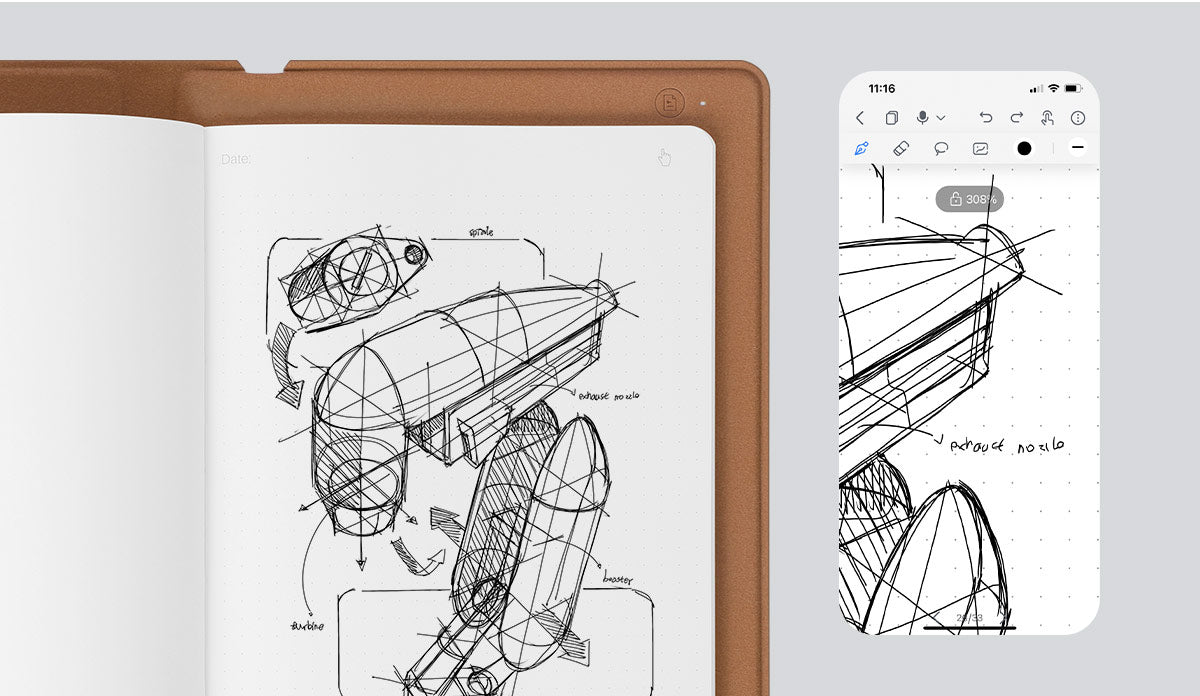
Everything you sketch on the paper can be instantly synced to your phone as a digital copy.
Strokes Record and Replay
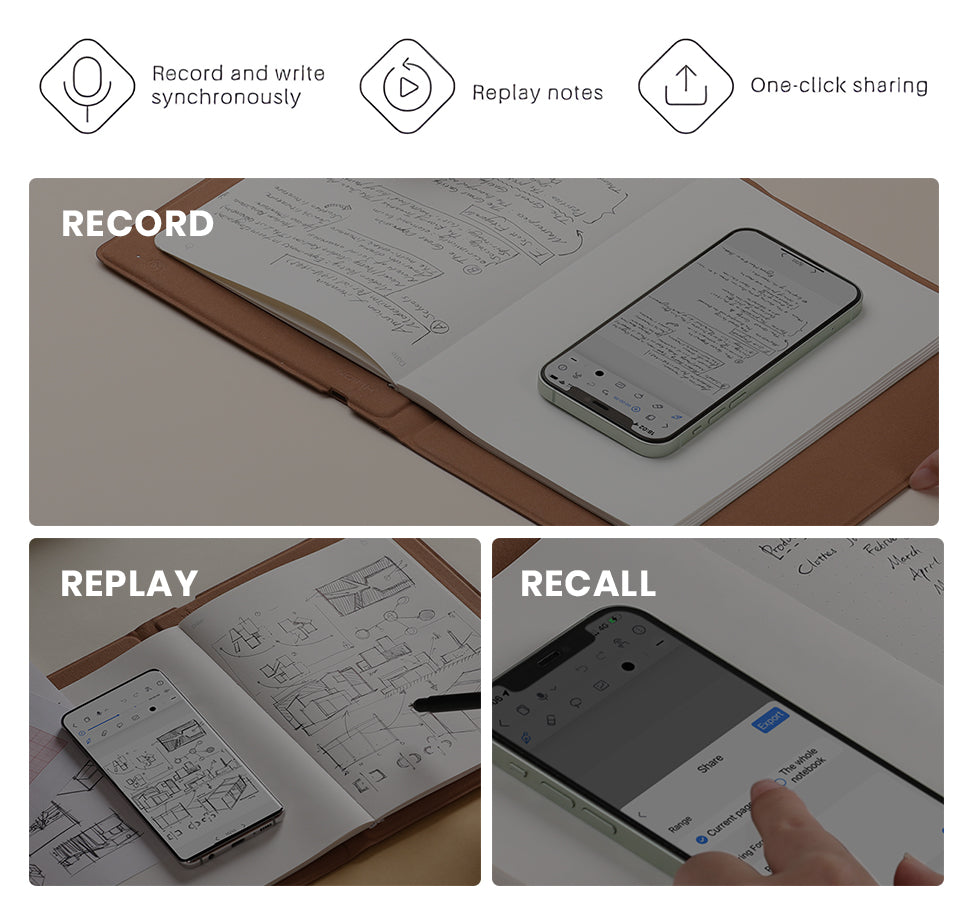
SketchTab Duo Pro supports the recording of strokes when drawing or taking notes. The replay feature helps you recall the steps in creating artwork or solving a problem.
Vector Ink · No Mosaic
Your work will be recorded as vector lines, ensuring no Mosaic, even when zoomed in several times.
Offline Storage
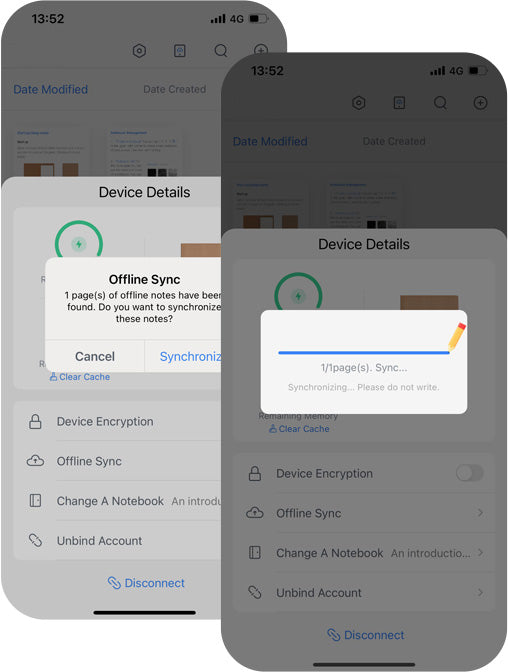
SketchTab Duo Pro supports offline storage of up to 50 pages. Focus and sketch without needing to keep your phone on. Once you're done, simply reconnect and all your work appears instantly on your mobile device.
In-App Multiple Edit Tools
Click each icon below to see all
Different Brushes
Eraser
Lasso Tool
Insert Pictures
RGB Color Picker
THE BRAND NEW
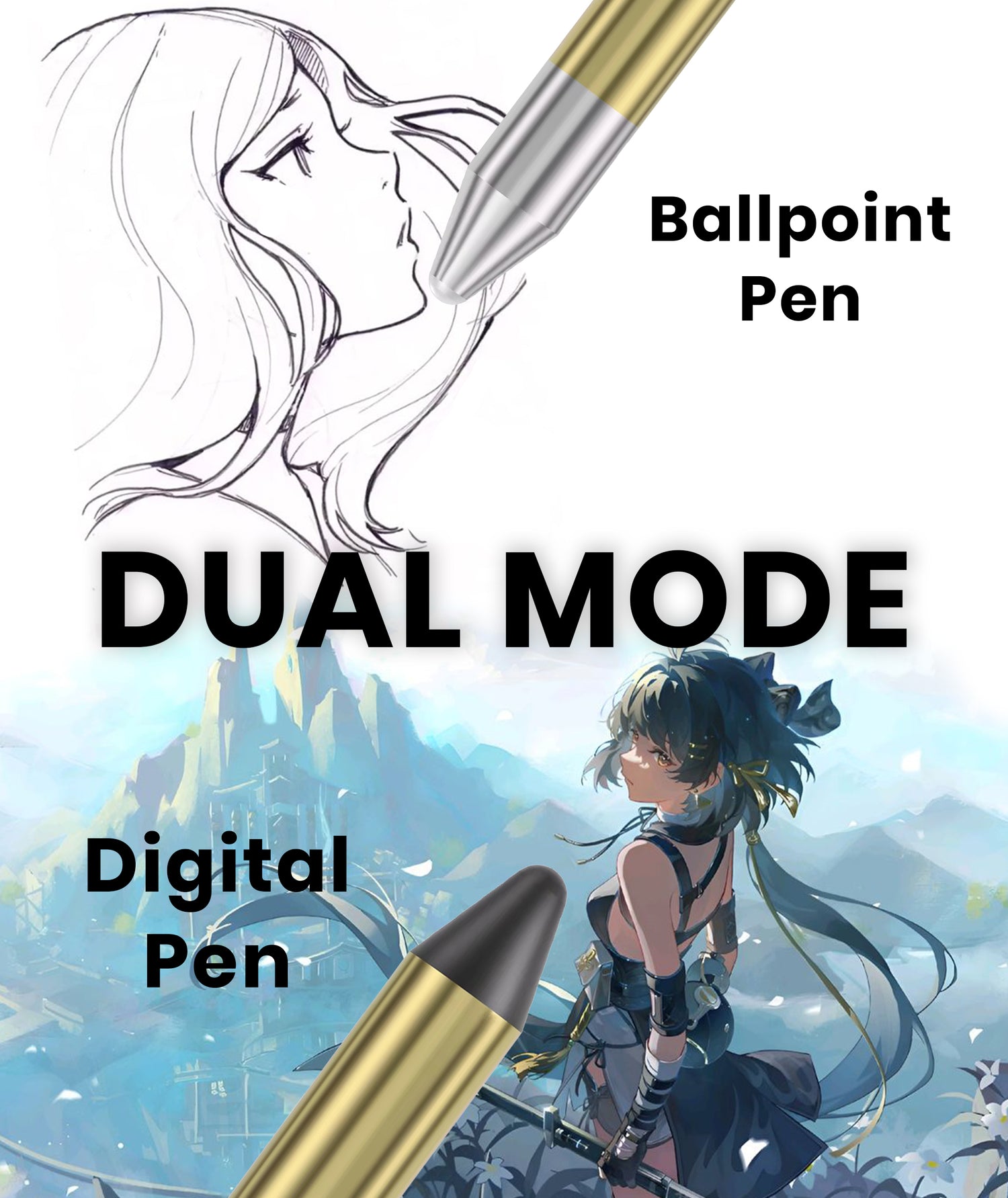
DUAL MODE
Easily transform your sketchbook to a professional drawing tablet
Dual Pen Nibs System
Ballpoint Pen for long-lasting sketching and writing, and Dedicated Digital Pen for professional drawing tablet use.
More Than a Smart Digital Book Does
Instantly transform your sketchbook into a digital drawing tablet for further modification and coloring. By replacing the inner paper pages with the Tablet Surface Cover, and connect to your PC or laptop.
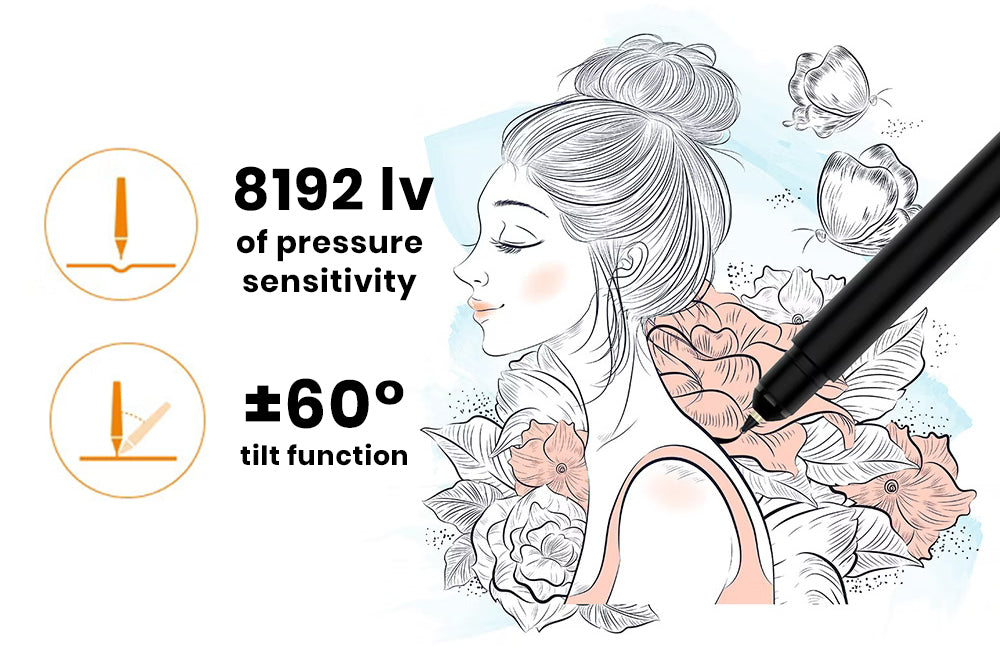
Syncify Pen Gen 3.0
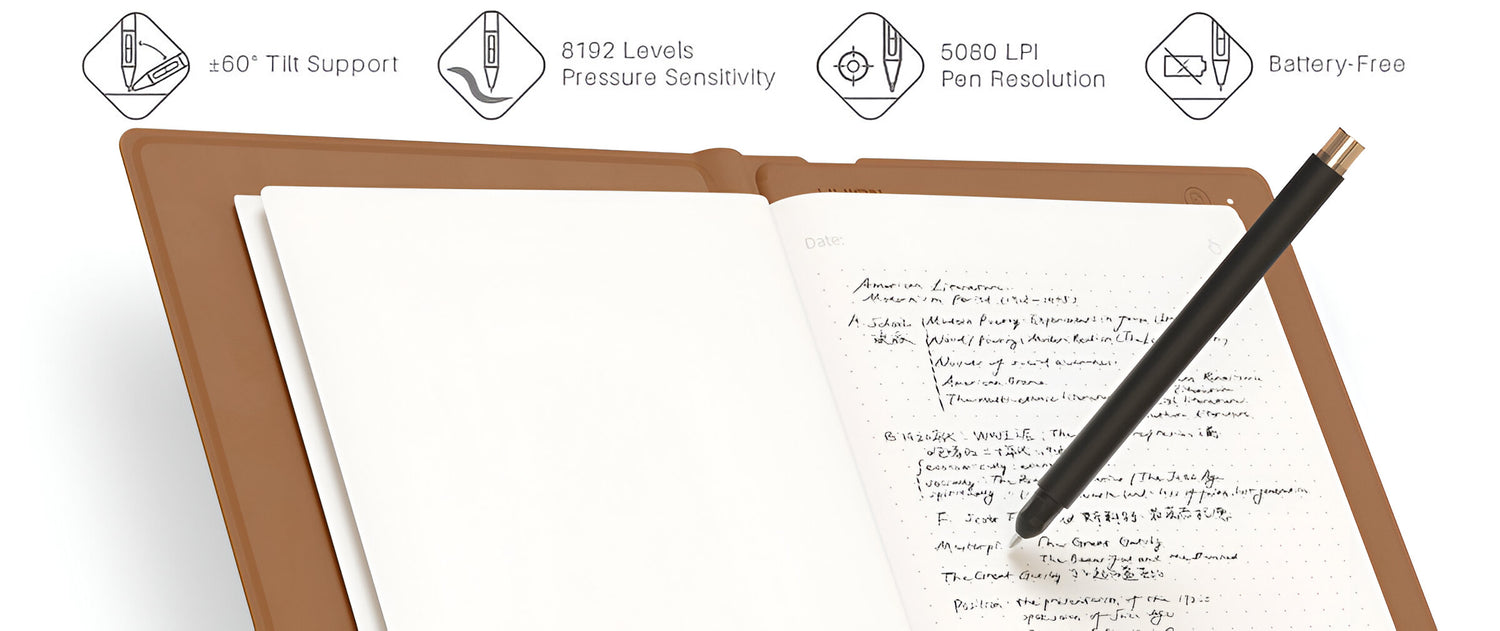
With 8192 levels of pressure sensitivity and ±60° tilt function to help you modify your creation.
Real Paper · Real Pen
Enjoy the tactile feel of drawing on real paper with our redesigned pen. Unlike other digital pens, it feels just like a traditional pen, offering a superior and authentic drawing experience.
Compact and Skin-friendly
It matches the size of a standard A5 notebook, fitting easily in your bag. Made from soft, durable, skin-friendly UV material. It also includes a magnetic pen sleeve to keep your pen secure and prevent loss.
FREQUENTLY ASKED
Questions
check_box
Do I need to charge the SketchTab Duo Pro when I first open the box?
We recommend charging it when you first receive it if you plan to connect it to your device via Bluetooth.
check_box
Does the pen need a battery?
No. The Syncify Pen Gen 3.0 doesn't have a battery and therefore no charging is needed!
check_box
Is the app compatible with both IOS and Android?
Absolutely! You can find the app on both the App Store and Google Play. Detailed instructions for downloading the app are included in our manual.
check_box
What do I do if I run out of papers? Does it work with my own paper?
Our SketchTab Duo Pro features standard A5 size pages. And yes, it works with ANY paper! When you run out, simply replace them by inserting any A5 notebook or sketchbook under 10mm thick, allowing you to choose your favorite paper texture.
For optimal performance, we recommend our extra SKETCHTAB Paper [50 pages]. Designed with a cover thickness that effortlessly fits into the SKETCHTAB cover, our smooth paper texture ensures the best writing and sketching experience.
check_box
How long will the ink in the ballpoint refill last?
The ballpoint refill can be used with a length of about 400m.
check_box
Does the drawing tablet mode compatible with any drawing app?
Yes, the drawing tablet mode is compatible with a wide range of drawing apps. Whether you use Adobe Photoshop, Corel Painter, Rebelle, or any other popular digital art software, the drawing tablet mode will work seamlessly.
To clarify, It functions as a standard drawing tablet, allowing you to use your preferred drawing app of choice with the tablet's pressure-sensitive input and other drawing-centric features. The drawing tablet mode is designed to be versatile and work with the full spectrum of digital art and design applications.
check_box
Do I have to use a phone or tablet for it all the time?
No, the SketchTab Duo Pro supports offline storage of up to 50 pages of notes. You don’t need to connect the phone or tablet all the time. The offline contents can be instantly synced to your mobile device once it is connected again.
check_box
Is there any delay in syncing?
No! Our SketchTab Duo Pro detects and sends signals to your phone instantly, ensuring no delays.
check_box
Shipping & Returns
Order Processing Time: 1-3 business days (demand is so high right now, it might take slightly longer)
Shipping Time (excludes processing time): US/CA/UK: 7-14 business days International: 7-20 business days More Details
Customer Reviews
Overall rating: 4.6 / 5 from 141 reviews.
I work as a full time digital artist and draw on a screen tablet everyday. My eyes get fatigued often and I miss drawing on the sketchbook. Of course I could get a sketchbook and scan it in, but that's a long and tedius process. I saw an ad for Syncify on social media one day, and it was literally my dream idea come to life. At first I was very skeptical like how could this even work? It didn’t really make sense to me, but I decided to give it a try. Turns out, it’s real and it works exactly as advertised!!! I found that this tablet/sketchbook fulfills my both my needs perfectly. I'm able to carry this tablet anywhere and turn my drawings to digital art on the go (highly recommend getting their clip holder too if you carry this around, stablizes the paper well). I think something that needs to be emphasized more is pressure sensitivity, I thought that since the ball point pen is pretty uniform in width that it would not register pressure sensitivity, but it does! And I really like that I can lightly draw on the paper and having that reflected on the app. I also like that I can carry around a sketchbook that can also act as a tablet when I need it for making quick sketches or more refined work through the mobile/laptop version of clip studio for example.
Everything considered, this is a great tablet/sketchbook and I hope more products like these are made to bridge traditional and digital art.
This is one of my first digital art system after a old friend gave me a Wacom awhile back. I will never change to anything but Syncify from now on. I was initially afraid that the setup and connection would be a hassle, especially since I’m not very tech-savvy. But to my surprise it was incredibly easy, everything connected seamlessly, and using it felt completely intuitive right from the start. The tablet quality is amazing the functionality is smooth and does actually feel like a really sketchbook. The design feels like luxury design. The price is a little high but it's totally worth it, buying mine used helped alot to ease the hurt in My wallet.
In terms of hybrid analog-digital books this is the best option I've tried so far. A lot of brands are a scam and this is NOT! I don't have to charge the pen, I can use any paper/sketchbook refill (this is a huge plus; I’ve tried other brands like Livescribe and Ophaya, but they only work with their own specific paper, and even worse their paper doesn’t even feel like real paper), and the pen nib is refillable too. For the price I much prefer it over other notable brands with proprietary smartbooks and pens. I would say battery life is decent on the tablet cover itself - I can get through a typical work day with no charging. It takes a bit to get used to using it with the app, remembering to press the "next page" button and all, but there's also the offline writing mode which I haven't had any issues with syncing afterwards.
I ordered this to be able to take along in my purse for doing some sketching in waiting rooms and taking notes during appointments. It's fantastic as a drawing pad with digital backup, but there's a little bit of parallax error which makes it less than perfect for detailed art, but I mean really really detailed art. I would say that's such a minor issue compared to how convenient and useful this device is overall.
I do love that it saves the works as vector, which helps immensely; vector files are much smaller than pixel in many cases, and infinitely scalable so I can scale the base sketch for a high-pixel-count detailed artwork or try to figure out what the heck it was that I wrote.
The Bluetooth connection is decent, and I love that it doesn't suddenly use only a small portion of the page when connected to an Android phone to back up notes. The wired performance is equivalent to almost any small graphics tablet.
The mobile app is pretty solid, allowing for great editing and highlighting; I find it ideal for single-page sketches and concept drawings, though it doesn't really do finish-level artwork well. That said, it’s easy to transfer the sketch to your computer and finalize it there using the tablet mode.
The notebook that comes in it has the sensor area marked, but it can take any thin to moderate A5 book--the company claims up to 10mm thick, which is about 1/4"; I find it works well with the kind of inexpensive kraft-cover notebooks that are about 30 pages per notebook and $20 for a dozen. Yeah, a notebook won't last very long, but they're inexpensive enough to go through a notebook every couple of weeks.
Such a solid sketchbook & tablet! I was amazed by how accurate the pen is. Even through a full stack of papers! One thing to beware of If you slide the paper while drawing or writing lines can be misplaced making it different on the paper compared to your phone. But the clip holder solves everything, especially you love drawing on the go. So guys you really need to get that clip holder from them!
I am in love with this! My digital sketches never look as good as my paper ones, I'm very much a person who needs to pencil sketch then draw and I just can't manage with a drawing tablet. This is hands down the best, it connects right to my phone (iphone) using the app included in the order. It also connects to my MacBook via Bluetooth with the driver software downloaded. Though I was initially confused finding the software, customer service was amazing at sending me exactly where I needed to go. Over all it's amazing! Finally get to digitize my art!
The Syncify SketchTab is really cool. I first started looking to digitize my doodles/notes years ago and went with the Rocketbook brand. It was ok. Being stuck to specific pens that only do decent with left-handed writing, the re-useable notebook was neat but cumbersome to use. The Syncify is also limited to a single specific pen; however, it seems that replacements are readily available. I also purchased the pencil cartridges, allowing me to effortlessly switch between pen and pencil, and the ink quality is standard/nice enough. Unlike other digital pens, the shape of the Syncify pen is exactly the same as a regular pen, making it feel much more comfortable even during long-term use.
The sketchtab duo pro does everything that I was looking for. First and foremost, ease of use. It is instantaneous when using it. The longest part of setting up the device was when creating the account I had to wait for the verification code to come through in an e-mail, but that only took a couple of minutes. I'm not even sure if creating an account is necessary. Once you scan the QR code from the App, it's paired and re-pairs itself fairly quickly as you open and close the pad. Similarly for tablet mode, I installed the driver first and then plugged it into the computer. Right away it was connected and usable. It should be noted that I found it most reliable to unplug and replug the device in when you put it into sleep mode.
The app is very good, which is great, can't believe it is included as a free gift, honestly I would even pay $30 for it if it weren’t free. In this case, the app has a multitude of notebook selections, pen styles, and a few tools for sketching/note-taking. Honestly, just in itself it is a very good app (though not ideal without the sketchtab duo pro!), and given that it is how you will likely primarily be interfacing with the sketchtab, this is a very important aspect and they did a good job. A couple of outstanding points -- you are able to create notebooks in the app, so I create a "Daily Tasks To-Do" list and each page is a separate part of the house. I also created a "Blueprints" and standard "Notes" notebook. This alone sets the app apart from others I've come across. Another nifty trick is to use the pens Tablet Rubber Nib on a blank page. You get the feel of writing, but of course there is no ink. It takes a second to get used to, as you'll be looking at the phone screen for where you've written on the page, but it's nice for when you want to take notes but without using up one page.
Tablet mode is also very serviceable, while it may not have gestures or buttons like a fully fledged Wacom tablet would, that's not really an issue since that's not it's main purpose. So far I've tried it out with photoshop and with storyboarder and it works exactly as you'd expect.
Possible negatives to look out for: First on this short list is the notepad paper itself just happens to be semi-easily affected by humidity. I have found that some papers tend to fold with use and perspiration. The default A5 paper that comes with this notebook seems to have this happen. However, the paper quality itself is very good and feels pleasant to write on. That said, you can easily swap it out with your own paper if needed, so in the end, it doesn’t really impact the user experience. Next is the possible longevity of the pen tips -- each tip is about 1/4th to 1/3rd the length of a normal pen. They advertise 400m, which I'm sure is plenty. I'm more thinking long term, say 8 years from now if everything will still be available. Finally, it sounds like only their brand of pen works -- to be expected. Don't lose it!
In short: The Syncify Sketchtab Duo Pro is very well advertised, delivering on everything it promises. Connecting to the App via Bluetooth on your phone is very easy, using it is very fluid, and interfacing between the two of them has next to no downsides that I came across. In addition to all of this, it can very easily connect to the computer to be used as a drawing tablet. The downsides that I tried to list are honestly not even about the device or the app itself, but just possible concerns about long term supply of pen tips and being extremely nitpicky.
I been using it for the tablet mode for my blender/krita project's. It works better then most of the. Cheaper tablets I used. I can’t wait to use the book for my Japanese and Spanish practice.
Was I nervous buying something off social media? Yes. Has this been immediately worth it?YESSS!!! Syncify Sketchtab is a nifty blend of a notepad and digital canvas. It's perfect for drawing or taking notes, easy to use, and feels really smooth with its pen. If you want something that works well for creativity and everyday tasks, this tablet's a great pick!
I have been dying to get this and I finally got it for birthday!! I had originally saw this on an ad on YouTube, and it finally came back to my mind. I made a short video of drawing my dog to give yall an overview of this amazing product. Reading the reviews, every bad review was mainly just people not actually understanding how to use it!! For example, using the app in general was so easy! The ‘loading’ screen isn’t actually a loading screen, it’s just some pages to scroll through but swiping to the left (to scroll right) until you get a start button!! I was a little confused at it at first, It took a few minutes of trial and error, but syncing the tablet was easier than expected. The little pamphlet that comes with the tablet says to ‘change the pen’ out, but you just have to take off the waxy tip, don’t waste the pen!! I personally like the app, and even though this request might be hard to make true, I think if there was a way to tell which page is 1, 2, 3 etc and when you write on the page, it automatically goes to that page. Yeah, it’s a bit of a stretch, but it would be nice if it existed. I love the tablet, it’s great, I love the app, it’s great! Also, maybe add in the instructions *where* to put the stick on drawing pad on the tablet for the drawing sheet…? I still haven’t put mine on yet :( also, I would personally point out the drawing pad pen nib to make it easier to define which job is which, because I think I read a review about that, too. Just to make things less confusing!! Another thing I would like to add as recommendations for future designs, maybe have a little attachment or something that can store extra pen-nibs so they don’t get lost or someone can easily use both the drawing pad nib and the regular pen nib? That would be great!! Thanks for reading this!!
I am very old school artist and prefer handwriting and drawing things over digital, but wanted to put together a digital recipe book for my kids and grandkids so this was my solution. I can hand draw on actual paper and they still get a digital form that they can share, print out, or look up.
I love writing and drawing on paper, I'm not used to writing on a digital screen, and this is a very good solution, and I love it because everything stays on my phone. The pen feels comfortable to use, even for long sessions, and the connection is stable. Syncing is surprisingly accurate, with no noticeable lag, making the whole experience feel smooth and natural.
This digital sketchpad is really stylish! I love the leather look and feel, and the size is perfect – not too big or too small. It's great for sketching, and the lines appear on the screen almost instantly.
Buying this Syncify sketchtab was totally worth it. I sketch a lot. I like to share them with my friends. This is a great way to transfer you work digitally without have to use a scanner. I was a bit worried about running out of ink too fast, but they include plenty of extra refills as a free gift with your order. After months of use, I’m still going strong with the refills I got. I don't feel like the price point is an issue if this will be useful to you. I prefer handwritten/handdrawn and tangible and this allows easy transfer to a digital without issues for easy digtal storage. So if I loose my physical copies I will always have a back up.
This is a great one; I will use it to digitalise my drawings for my lectures and share the process of making videos with my students. I found it very useful that you can record the voiceover while you draw.
It's a wonderful book, I couldn't imagine the quality of the writing, how easy it is to integrate it into the tablet and how useful it is.
I'm a field engineer, so I'm always at the plant making diagrams, designing machines, taking notes. Now, with my sketchtab, that's incredibly easy. The quality of the pen is amazing, even more so when I discovered that I can use it as a digital tablet.
I use it to make drawings and it's much better than any Wacom, especially because of the size. It is A5 size. I am very happy and very grateful, your service is great.
I didn't know you could use any paper, I thought it was just the one it came with. When I first got the device, I figured I’d be stuck with the default paper, but then I found out that you can actually use any paper you want, which was a game-changer. It gives so much more flexibility, allowing me to choose paper that suits my style or preferences. Whether I need thicker paper for smoother ink flow or thinner paper for more portability, the options are endless. It’s a really great feature I didn’t expect!
Quick setup and the tablet mode works amazing with art programs like Krita and Fire Alpaca! Super cute size and it comes with extra pen nibs for free🤗💖 if ya looking for a portable tablet this one is great
This is the perfect digital pad for me!
It makes note taking and doodling much more convenient. It’s simple design makes it easy to setup use. One of the coolest features is that it can record and playback your entire drawing process, which is super interesting to watch and even helps me improve my technique. Being able to switch from using the paper or using the actual pad to draw was why I got it. It’s an inexpensive tablet and notepad. I highly recommend it for artist and writers alike or just about anyone.
My son loves art. And he wanted to do digital but I didn't want him to loose his free hand skills. This worked worked perfect because he still have to draw on the paper and pay attention but it connects to a screen so he can edit or see what he did wrong an save all his work. Instead of the 100 drawing pads we have. Even though they are filled with amazing stuff for a 9 year old.
Excellent price as a lot of simple graphic pads cost as much or more. Having a transfer surface with hard copy pages is nice. You can keep the originals if needed for legal purposes and send the electronic version as copies. If there's a design issue later, you can see to reference the originals. Nice looking notebook, to take to work or class. Excellent battery time at 18 hours more or less, exceeds most tablets. Easy to access app and connect a phone, or tablet to the device, or a computer as well. Recommended.
Beautiful high quality, and cant beat the price. Easy to set up and use, and a fun way to fill in time when out at long waiting appointments. Always practicing drawing, so perfect for me.
This is an amazing product that runs smoothly and is easy to work with! It is great for traditional artists wanting to work with digital art. I also love to insert my own favorite sketchbook into the cover, which works perfectly with it. The only issue with the product is that sometimes after you close the drawing pen on the online version your drawing is not aligned with where you drew on the actual paper. But when I reached out to the company, they recommended getting a clip holder, and it completely solved the problem by stabilizing the paper. So, I highly recommend getting one!
Really good combination of tech and tradition. The tablet itself is really good, fast response, and accurate. Combined with the folio and notepad makes it super handy, can go back to sketches from weeks ago and make amendments which are sync'd with digital copy. Disappointed I didn't find this sooner.
It provides what it is advertised for... well suited for my needs. I like its portability and ease of use; I especially like that I can do some sketches and transfer the them to the smartphone app for long time storage and further editing later. So far I have not found any issues with the device.
Needed something to journal and a way to organize. I love doodling and writing on paper and in converts my writing to digital form. The price was great and looks very professional and luxurious.
It’s a fantastic device. I was initially disappointed that I couldn’t find book refills, but then customer service told me I can just use my own paper. That’s mind-blowing!
It's actually a very functional product and better than I expected, I bought it for my wife who always had a lot of papers up and down and now she can better organize her sketches with this book, recommended for anyone who has to take a lot of notes/love sketching on paper and doesn't like to use a digital tablet
This was Christmas gift for my niece who is in school with reams of notes taken in class. She absolutely loved it and will report back to me after she’s had time for practical use.
My college student loves this high-tech sketchbook and pen. She thinks it is the coolest thing! The pen works as advertised. It is portable for college courses, the color is readable and stands out well. This was a decent value but it would be nice if this pen came with more paper. Very cool invention!
I'm going back to college... as such I really wanted a place to store my notes while I took my classes. This allows me access in two ways. Physical and virtual! My classes don't start for 2 more weeks, but I bought some random A5 journals to try them out... You have to line it up right, but once you do, it works great!
For those who do not want to give up handdrawing on paper, but still be able to digitalize the work. it is the perfect product. Fast shipping, very easy to install and ready to work
Works really well! It does exactly as it promises to do and is very easy to set up and use. I have it successfully attached to my phone, my tablet and my laptop! Great product!


![[EXTRA] SKETCHTAB Papers [50 Pages]](http://thesyncify.com/cdn/shop/files/extrapapers.jpg?v=1722000676&width=500)
![[EXTRA] SKETCHTAB Pen Refills [5pc]](http://thesyncify.com/cdn/shop/files/Huion-Note-Original-Replacement-Refills-Pack-of-5-Replacement-Ballpoint-Pen-Refills-or-5-Plastic-Pen.jpg__2.jpg?v=1722000907&width=500)



![[Premium Edition] SYNCIFY - SketchTab Duo PRO](http://thesyncify.com/cdn/shop/files/P1withfreegift_102_d5c715a8-826c-410a-bd9a-83b9d4ab807c.jpg?v=1740911061&width=500)
![[Duo PRO] Magnetic Pen Sleeve](http://thesyncify.com/cdn/shop/files/pen_f4108302-6102-4ef0-91f4-139791227684.jpg?v=1737743815&width=500)
![[Add-On] SKETCHTAB Pencil Nibs [3pc]](http://thesyncify.com/cdn/shop/files/pencil3.jpg?v=1722923220&width=500)
![[Premium Edition] SYNCIFY - SketchTab Duo PRO](http://thesyncify.com/cdn/shop/files/P1withfreegift_102_d5c715a8-826c-410a-bd9a-83b9d4ab807c.jpg?v=1740911061&width=1445)
![[Premium Edition] SYNCIFY - SketchTab Duo PRO](http://thesyncify.com/cdn/shop/files/DUALMODE.jpg?v=1740911061&width=1445)
![[Premium Edition] SYNCIFY - SketchTab Duo PRO](http://thesyncify.com/cdn/shop/files/penfeatures.jpg?v=1740911061&width=1445)
![[Premium Edition] SYNCIFY - SketchTab Duo PRO](http://thesyncify.com/cdn/shop/files/clipholderforproductphoto.jpg?v=1740911061&width=1445)
![[Premium Edition] SYNCIFY - SketchTab Duo PRO](http://thesyncify.com/cdn/shop/files/bookfront.jpg?v=1740911061&width=1445)
![[Premium Edition] SYNCIFY - SketchTab Duo PRO](http://thesyncify.com/cdn/shop/files/huion-note-smart-notebook-08_webp.jpg?v=1740911061&width=1445)
![[Premium Edition] SYNCIFY - SketchTab Duo PRO](http://thesyncify.com/cdn/shop/files/pen.jpg?v=1740911061&width=1445)
![[Premium Edition] SYNCIFY - SketchTab Duo PRO](http://thesyncify.com/cdn/shop/files/drawingtab.jpg?v=1740911061&width=1445)
![[Premium Edition] SYNCIFY - SketchTab Duo PRO](http://thesyncify.com/cdn/shop/files/packagecomponents.jpg?v=1740911061&width=1445)
![[Premium Edition] SYNCIFY - SketchTab Duo PRO](http://thesyncify.com/cdn/shop/files/Componentsdetails_updatedwithfreegift.jpg?v=1740911061&width=1445)
![[Premium Edition] SYNCIFY - SketchTab Duo PRO](http://thesyncify.com/cdn/shop/files/proartistbundle_102_b613f602-3595-43bb-8c2d-67ba2756fd7a.jpg?v=1740911057&width=1445)








![Customer photo review of [Premium Edition] SYNCIFY - SketchTab Duo PRO](http://images.loox.io/uploads/2025/6/18/G0YZw5wBZ_mid.jpg)
![Customer video review of [Premium Edition] SYNCIFY - SketchTab Duo PRO](http://images.loox.io/uploads/2025/6/18/jghipipjf_orig_mid.jpg)
![Customer video review of [Premium Edition] SYNCIFY - SketchTab Duo PRO](http://images.loox.io/uploads/2025/6/18/fDHRYar7O_orig_mid.jpg)
![Customer video review of [Premium Edition] SYNCIFY - SketchTab Duo PRO](http://images.loox.io/uploads/2025/6/18/6wOUQA6c0_orig_mid.jpg)
![Customer photo review of [Premium Edition] SYNCIFY - SketchTab Duo PRO](http://images.loox.io/uploads/2025/6/18/888u0k2DH_mid.jpg)
![Customer photo review of [Premium Edition] SYNCIFY - SketchTab Duo PRO](http://images.loox.io/uploads/2025/6/18/BOroCbR3Y_mid.jpg)
![Customer photo review of [Premium Edition] SYNCIFY - SketchTab Duo PRO](http://images.loox.io/uploads/2025/6/18/c9M2m8WH2_mid.jpg)
![Customer video review of [Premium Edition] SYNCIFY - SketchTab Duo PRO](http://images.loox.io/uploads/2025/6/18/ia3pmKJqk_orig_mid.jpg)
![Customer video review of [Premium Edition] SYNCIFY - SketchTab Duo PRO](http://images.loox.io/uploads/2025/6/18/MAMMHY_7j_orig_mid.jpg)
![Customer video review of [Premium Edition] SYNCIFY - SketchTab Duo PRO](http://images.loox.io/uploads/2025/6/18/Nb0Y-dF9__orig_mid.jpg)
![Customer video review of [Premium Edition] SYNCIFY - SketchTab Duo PRO](http://images.loox.io/uploads/2025/6/18/mLNEZwSpC_orig_mid.jpg)
![Customer video review of [Premium Edition] SYNCIFY - SketchTab Duo PRO](http://images.loox.io/uploads/2025/6/18/9kkZHHqxZ_orig_mid.jpg)
![Customer photo review of [Premium Edition] SYNCIFY - SketchTab Duo PRO](http://images.loox.io/uploads/2025/6/18/z4Sl9LeTv_mid.jpg)
![Customer photo review of [Premium Edition] SYNCIFY - SketchTab Duo PRO](http://images.loox.io/uploads/2025/6/18/T4I_oXNlV_mid.jpg)
![Customer photo review of [Premium Edition] SYNCIFY - SketchTab Duo PRO](http://images.loox.io/uploads/2025/6/18/xOsbpFaUA_mid.jpg)
![Customer video review of [Premium Edition] SYNCIFY - SketchTab Duo PRO](http://images.loox.io/uploads/2025/6/18/XDDpkP-xG_orig_mid.jpg)
![Customer photo review of [Premium Edition] SYNCIFY - SketchTab Duo PRO](http://images.loox.io/uploads/2025/6/18/jAzVbhpUS_mid.jpg)
![Customer video review of [Premium Edition] SYNCIFY - SketchTab Duo PRO](http://images.loox.io/uploads/2025/6/18/WaGL8aNyu_orig_mid.jpg)
![Customer video review of [Premium Edition] SYNCIFY - SketchTab Duo PRO](http://images.loox.io/uploads/2025/6/18/PMUPTbRrP_orig_mid.jpg)
![Customer photo review of [Premium Edition] SYNCIFY - SketchTab Duo PRO](http://images.loox.io/uploads/2025/6/18/lk0TVZ-XT_mid.jpg)
![Customer photo review of [Premium Edition] SYNCIFY - SketchTab Duo PRO](http://images.loox.io/uploads/2025/6/18/4qfEDd_yp_mid.jpg)
![Customer video review of [Premium Edition] SYNCIFY - SketchTab Duo PRO](http://images.loox.io/uploads/2025/6/18/dIpaxwyG3_orig_mid.jpg)
![Customer photo review of [Premium Edition] SYNCIFY - SketchTab Duo PRO](http://images.loox.io/uploads/2025/6/18/1I0pNmWlG_mid.jpg)
![Customer photo review of [Premium Edition] SYNCIFY - SketchTab Duo PRO](http://images.loox.io/uploads/2025/6/18/L89R7KGP3_mid.jpg)
![Customer photo review of [Premium Edition] SYNCIFY - SketchTab Duo PRO](http://images.loox.io/uploads/2025/6/18/VrsrTHRcx_mid.jpg)
![Customer photo review of [Premium Edition] SYNCIFY - SketchTab Duo PRO](http://images.loox.io/uploads/2025/6/18/XTid7_BL7_mid.jpg)
![Customer photo review of [Premium Edition] SYNCIFY - SketchTab Duo PRO](http://images.loox.io/uploads/2025/6/18/sKbxzSE7T_mid.jpg)
![Customer photo review of [Premium Edition] SYNCIFY - SketchTab Duo PRO](http://images.loox.io/uploads/2025/6/18/YUXdT0Q7a_mid.jpg)